


Please conduct the following tasks alone. For implementation details you can refer to the lecture slides or the Android developer website. Please do not hesitate to ask me or the tutor if you have any questions.
assignmentCode/assignment5 into the assignment5 folder of your Git repository. The
starter is the solution of assignment 4 plus a Retrofit client for the OMDb API and
the Coil image loading library.local.properties in the project root:OMDB_API_KEY=your_key_here local.properties is ignored by Git, so the key never ends up in your repository. The build reads it and makes
it available as BuildConfig.OMDB_API_KEY (see app/build.gradle.kts).
https://www.omdbapi.com/?apikey=YOURKEY&s=Matrix, where "Matrix" is the text from the textField.TODOs of the starter:network/MovieApi.kt: the two @Query parameters s and apikey of searchMovies().ui/search/SearchViewModel.kt: searchMovies() calls the API in a coroutine, shows a loading state and
handles the error cases.ui/composables/MovieItem.kt: the poster with AsyncImage.model/Movie.kt: the entity now has the fields of the API (imdbId, title, year, poster), actor is
gone. @SerializedName maps the JSON keys (imdbID, Title, ...) to the Kotlin properties, so the same class is
the Room entity and the Gson target. A movie cannot be saved twice (unique index on imdbId).model/MovieDatabase.kt: the schema changed, therefore the database version is 2 and
fallbackToDestructiveMigration() deletes the old data instead of migrating it. Uninstall the assignment 4 app
from your emulator before you start, otherwise the old database is still there.network/MovieApi.kt: the Retrofit interface. network/SearchResponse.kt: the JSON object of the search endpoint.MovieTrackerApplication.kt: the AppContainer additionally builds the Retrofit client and passes it to the
SearchViewModel.AndroidManifest.xml: the INTERNET permission.ui/search/SearchViewModel.kt: SearchUiState has isLoading and errorMessage, the SearchScreen shows a
progress indicator and the error text.Request: https://www.omdbapi.com/?apikey=YOURKEY&s=Matrix
{
  "Search": [
    {
      "Title": "The Matrix",
      "Year": "1999",
      "imdbID": "tt0133093",
      "Type": "movie",
      "Poster": "https://m.media-amazon.com/images/M/MV5BN2NmN2VhMTQtMDNiOS00NDlhLTliMjgtODE2ZTY0ODQyNDRhXkEyXkFqcGc@._V1_SX300.jpg"
    },
    {
      "Title": "The Matrix Reloaded",
      "Year": "2003",
      "imdbID": "tt0234215",
      "Type": "movie",
      "Poster": "N/A"
    }
  ],
  "totalResults": "2",
  "Response": "True"
}
Without results the object looks like this, Search is missing:
{ "Response": "False", "Error": "Movie not found!" }Therefore SearchResponse.search is nullable. The poster URL can be the string "N/A": Coil cannot load it and
shows the error painter instead.
@Query("s") searchString: String adds ?s=... to the request. Give the apikey parameter the
default value BuildConfig.OMDB_API_KEY, then the ViewModel only passes the search string.searchMovies() in the API interface is a suspend function. Call it inside
viewModelScope.launch { ... } and wrap it in try/catch: an IOException means no network, a
retrofit2.HttpException means the server answered with an error code (401 when the key is wrong).SearchUiState(isLoading = true) before the request and the result (or the error message)
afterwards. The SearchScreen already renders isLoading and errorMessage.AsyncImage(model = movie.poster, contentDescription = null, error = painterResource(R.drawable.ic_movie_placeholder), modifier = Modifier.width(80.dp).height(120.dp)).Search screen:
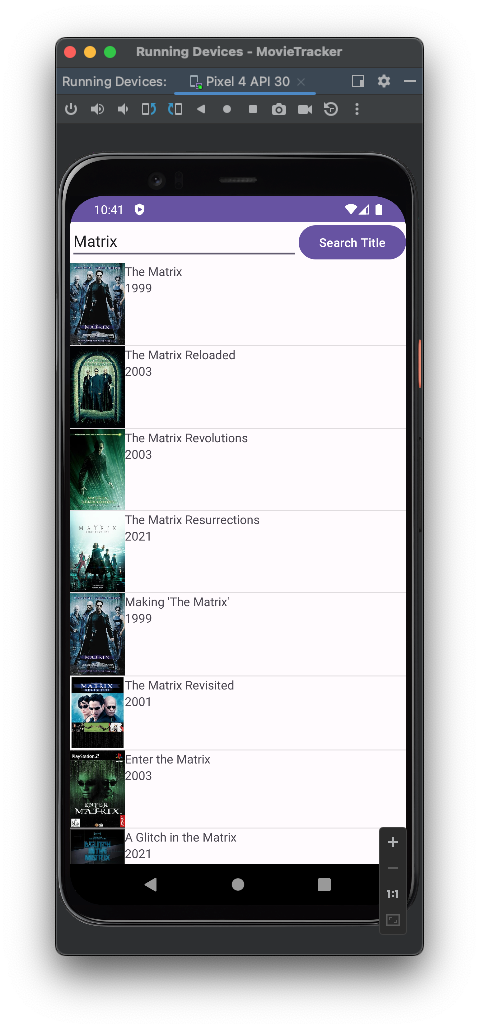
Home screen:
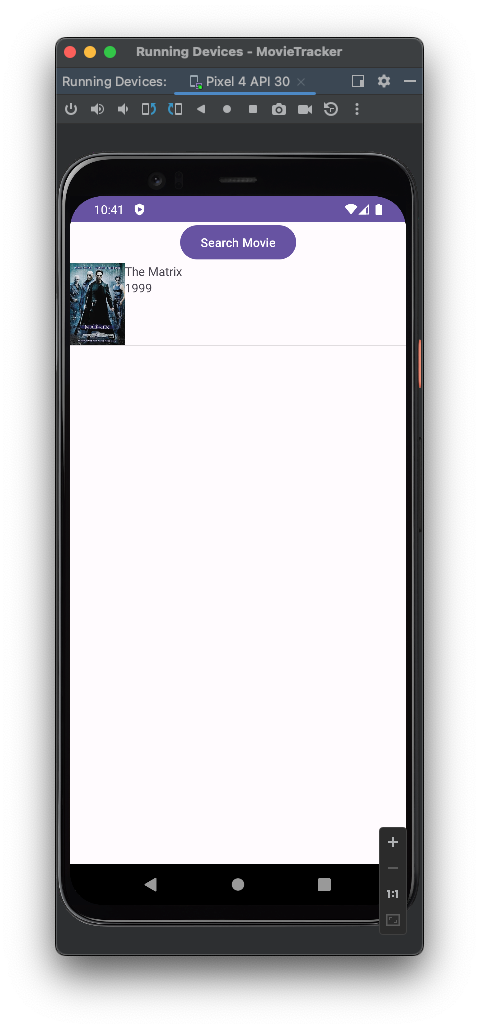
The test (Assignment5Test.kt) needs internet access and an empty app state (uninstall the app first). It depends on
the live OMDb data: the search "Matrix" has to return "The Matrix", the search "her" has to return "Her".
package de.hdmstuttgart.movietracker

import androidx.compose.ui.test.SemanticsNodeInteraction
import androidx.compose.ui.test.assertTextContains
import androidx.compose.ui.test.hasTestTag
import androidx.compose.ui.test.hasText
import androidx.compose.ui.test.junit4.createAndroidComposeRule
import androidx.compose.ui.test.onAllNodesWithTag
import androidx.compose.ui.test.onNodeWithTag
import androidx.compose.ui.test.performClick
import androidx.compose.ui.test.performTextInput
import org.junit.FixMethodOrder
import org.junit.Rule
import org.junit.Test
import org.junit.runners.MethodSorters

@FixMethodOrder(MethodSorters.NAME_ASCENDING)
class Assignment5Test {

    @get:Rule
    val composeTestRule = createAndroidComposeRule<MainActivity>()

    /** Waits until at least [count] movie items are shown (the data arrives asynchronously). */
    private fun waitForMovieItems(count: Int) {
        composeTestRule.waitUntil(timeoutMillis = TIMEOUT) {
            composeTestRule.onAllNodesWithTag("movieItem").fetchSemanticsNodes().size >= count
        }
    }

    /** Searches for [query] and waits until a result with the exact title [title] is shown. */
    private fun searchAndWaitFor(query: String, title: String): SemanticsNodeInteraction {
        composeTestRule.onNodeWithTag("openSearchButton").performClick()
        composeTestRule.onNodeWithTag("textField").performTextInput(query)
        composeTestRule.onNodeWithTag("searchButton").performClick()
        val matcher = hasTestTag("movieItem") and hasText(title)
        composeTestRule.waitUntil(timeoutMillis = TIMEOUT) {
            composeTestRule.onAllNodes(matcher).fetchSemanticsNodes().isNotEmpty()
        }
        return composeTestRule.onAllNodes(matcher)[0]
    }

    @Test
    fun test1_searchAndSaveTheMatrix() {
        searchAndWaitFor("Matrix", "The Matrix").performClick()
        waitForMovieItems(1)
        composeTestRule.onAllNodesWithTag("movieItem")[0].assertTextContains("The Matrix")
    }

    @Test
    fun test2_searchAndSaveHer() {
        waitForMovieItems(1)
        composeTestRule.onAllNodesWithTag("movieItem")[0].assertTextContains("The Matrix")
        searchAndWaitFor("her", "Her").performClick()
        waitForMovieItems(2)
    }

    @Test
    fun test3_savedMoviesAreShownInOrder() {
        waitForMovieItems(2)
        composeTestRule.onAllNodesWithTag("movieItem")[0].assertTextContains("The Matrix")
        composeTestRule.onAllNodesWithTag("movieItem")[1].assertTextContains("Her")
    }

    companion object {
        private const val TIMEOUT = 10_000L
    }
}Retrofit, Gson and Coil are already configured in the starter. These are the relevant lines:
gradle/libs.versions.toml:
[versions]
retrofit = "3.0.0"
gson = "2.14.0"
coil = "3.5.0"

[libraries]
retrofit = { group = "com.squareup.retrofit2", name = "retrofit", version.ref = "retrofit" }
retrofit-converter-gson = { group = "com.squareup.retrofit2", name = "converter-gson", version.ref = "retrofit" }
gson = { group = "com.google.code.gson", name = "gson", version.ref = "gson" }
coil-compose = { group = "io.coil-kt.coil3", name = "coil-compose", version.ref = "coil" }
coil-network-okhttp = { group = "io.coil-kt.coil3", name = "coil-network-okhttp", version.ref = "coil" }
Module app/build.gradle.kts:
// Reads OMDB_API_KEY from local.properties
val localProperties = Properties().apply {
    val file = rootProject.file("local.properties")
    if (file.exists()) file.inputStream().use { load(it) }
}
val omdbApiKey: String = localProperties.getProperty("OMDB_API_KEY") ?: ""

android {
    defaultConfig {
        // ...
        buildConfigField("String", "OMDB_API_KEY", "\"$omdbApiKey\"")
    }
    buildFeatures {
        compose = true
        buildConfig = true
    }
}

dependencies {
    implementation(libs.retrofit)
    implementation(libs.retrofit.converter.gson)
    implementation(libs.gson)
    implementation(libs.coil.compose)
    implementation(libs.coil.network.okhttp)   // Coil needs a network client to load URLs
    // ...
}assignment5 folder of your Git repository (assignment5/app/src/main/...).local.properties is in .gitignore, keep it there.Assignment5Test.kt is replaced by the reference version and executed on a fresh emulator with
the lecturer's API key in local.properties.